Podcast Transcript Search: How to Find and Verify Mentions
Podcast transcript search explained: find exact phrases, jump to timestamps, and verify mentions before you cite them in reports.
A client asks a simple question late on a Friday. Did a founder mention the company on a podcast last month, and can the exact line go into a board update? Nobody has the episode title, the audio runs close to two hours, and the only clue is a half-remembered phrase about pricing. That's the normal starting point for podcast transcript search, and it's why method matters more than enthusiasm for a keyword hit.
Podcasts now carry material that never reaches a press release or article. Edison Research's Infinite Dial 2025 survey of 5,020 Americans aged 12 and older found that 70% had ever listened to a podcast, an estimated 202 million people, and 55% were monthly podcast consumers. Pew Research Center's podcasts and news fact sheet reported that 32% of U.S. adults said they got news from podcasts at least sometimes in 2025, up from 22% in 2020. A transcript hit is therefore a lead worth checking, not a finished answer. A missing hit is a coverage question, not proof that nobody said it.
Table of Contents #
- Query Forms That Find the Right Passage
- How to Run a Search and Jump to the Timestamp
- Why Some Episodes Never Show Up
- Verify a Match Before You Quote It
- Export Transcripts and Timestamps for Reports
- Set Up a Monitoring Routine That Catches New Mentions
Query Forms That Find the Right Passage #
The half-remembered phrase is a trap. It tempts a searcher into typing the whole sentence, getting nothing, and reporting silence. A better approach starts with the query form that matches what is known. A phrase needs different handling from a name, and a name needs different handling from a topic that's still being mapped.
Quoted words in a Podzone search match as an exact phrase. Unquoted keywords match more loosely, which helps when the speaker's wording is unknown. Episode search also covers what was said in an episode and its title and description, so a title hit and a spoken hit aren't the same evidence. A title match proves an editor chose the words. A transcript match suggests a speaker said them, subject to audio verification.
Pick the Form Before Typing #
Query forms and what each one finds
| Query form | Example | What it finds | Use it when |
|---|---|---|---|
| Exact phrase in quotes | 'supply chain delay' | Episodes containing those words in that exact order | You need a specific claim or a quotable line |
| Unquoted keywords | supply chain delay | Episodes containing the terms, not necessarily together | You are exploring and do not know the wording yet |
| Person or brand name | Jane Doe or Acme | Spoken mentions plus title and description matches | Tracking a guest, host or company |
| Name plus context term | Acme pricing | Episodes where the name appears near a related topic | Filtering out passing or unrelated mentions |
| Name variants | Acme Inc, ACME, Acme app | Spelling and form variants that transcription may split | A transcript may have misspelled or split the name |
Start with a person or brand name alone. The first pass shows volume, the shows that mention the name repeatedly, and whether results cluster around hosts, guests, or sponsors. Then add a context term, such as a product category, competitor, employer, or issue. Acme pricing returns a narrower set than Acme, and it removes passing references that waste review time.
Practical rule: Start broad to see how a topic spreads, then switch to quoted phrases once the exact wording is known.
Variants are not busywork. Automated speech recognition can split, merge, or misspell names, especially acronyms and technical terms. Search the name without a suffix, the abbreviation, the spelled-out form, and likely possessives or product forms. If Acme Inc returns nothing, that doesn't clear Acme, ACME, or Acme app. Log title and description matches separately from spoken matches, or the final count will mix editorial labelling with actual conversation.
For exploratory work, unquoted keywords reveal the vocabulary speakers use. Hosts rarely use the phrase in a client's slide deck. They shorten it, reorder it, or replace it with slang. Once real wording surfaces in excerpts, quoted phrases become the precision tool for finding the claim again and testing whether other episodes repeat it.
How to Run a Search and Jump to the Timestamp #
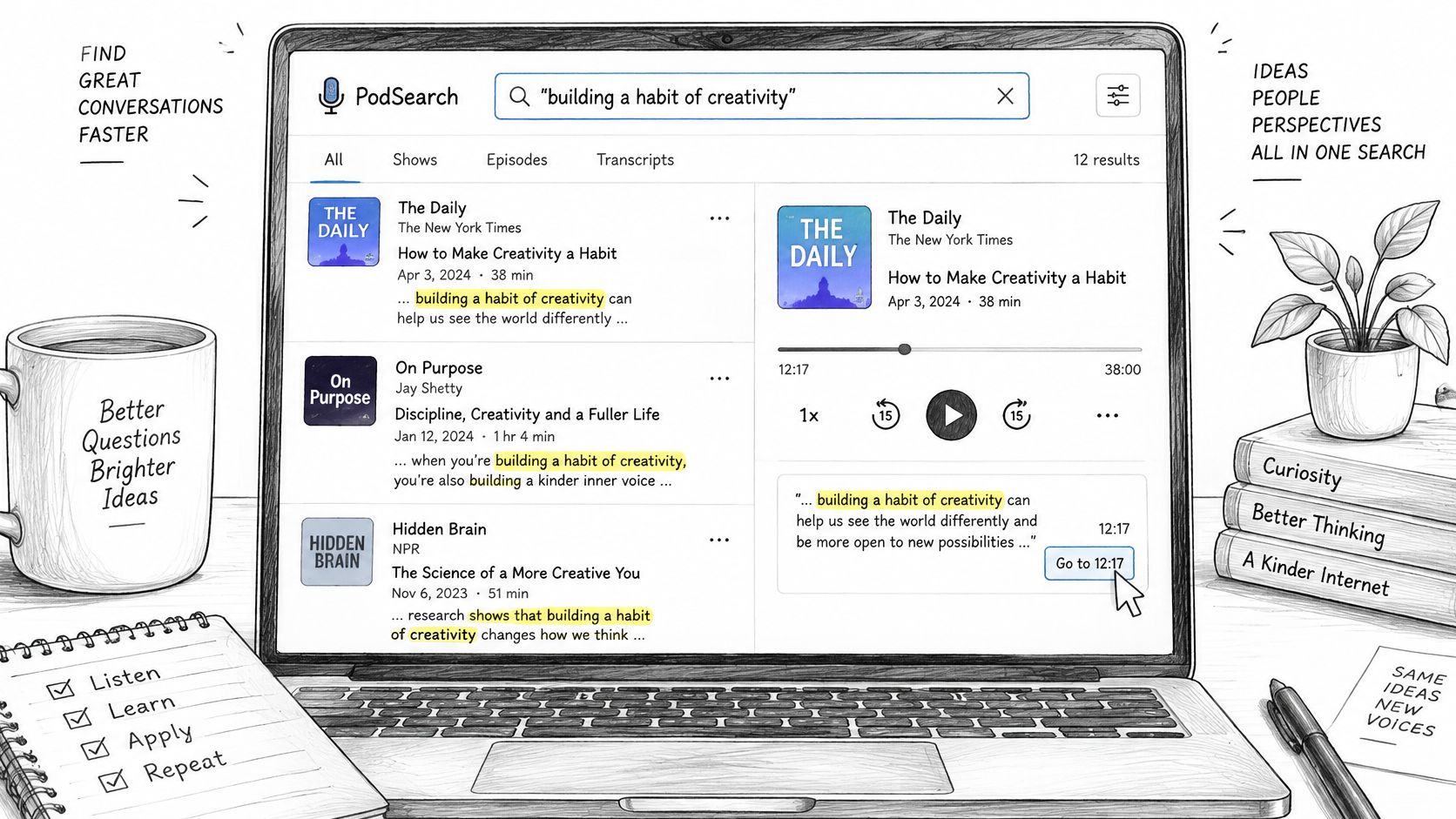
A usable search produces evidence that another analyst can retrace. Speed helps, but a fast result with no speaker, no context, and a timestamp that lands on silence doesn't survive client review. Each Podzone search result includes the episode's ID, its podcast, and short excerpts around the match. Transcript search results also give each passage's start and end time in seconds, which shows how long the passage runs before playback begins.
Five Steps From Query to Audio #
- Run the query: Enter the chosen form, using quotes for an exact phrase and variants for names that transcription may have split.
- Scan the result: Read the show name, episode title, and excerpt around the match. The excerpt shows whether the speaker, topic, and surrounding words fit the brief.
- Open the transcript: Find the matching passage in the episode transcript and note the start and end times before opening the audio.
- Listen around the passage: Jump to the start time, then listen from about 30 seconds before the passage to about 30 seconds after it. That window reveals who's speaking, whether a claim is being endorsed or challenged, and whether laughter or interruption changes the meaning.
- Record the finding: Note whether the quoted words were heard in the audio itself, then log the match with the reporting fields used for exports so the record is complete from the start.
Don't judge a result by the highlighted term alone. Read the excerpt for pronouns and unnamed references. A passage may say "their pricing" while the company name appeared two sentences earlier. The reverse also happens. A name appears in the excerpt, but the interesting claim belongs to a competitor discussed immediately afterward.
What a Usable Result Looks Like #
A usable result has three features.
- Clear speaker: The host, guest, or advertiser can be identified from context.
- Readable excerpt: The surrounding passage supports the interpretation being recorded.
- Accurate timestamp: Playback lands on the spoken words, not on music, silence, or a different topic.
If one feature is missing, the match stays provisional. Flag it for a longer listen rather than forcing a label. That discipline saves time later, when a quote gets challenged and someone asks for the original moment.
Why Some Episodes Never Show Up #
An empty result is the most misread outcome in podcast transcript search. It can mean nobody used the terms. It can also mean the episode was never searchable. Those two conclusions support very different advice, yet teams often merge them into one reassuring sentence. They shouldn't.
Podzone ingests publicly published podcast feeds, transcribes the episodes they reference, and makes the resulting transcripts searchable. A private feed, an episode outside public feeds, or a platform that keeps transcripts private won't appear in that process. Podzone also transcribes episodes as they are published and checks each transcript against the rules of the alert, but a very recent episode can still be missing until processing finishes.
Coverage across the wider ecosystem is uneven for a simpler reason. Many publishers don't supply a transcript file at all. An industry analysis of Podcasting 2.0 transcript adoption estimated that only 7,743,206 episodes, about 4.84% of 160,072,993 publicly discovered episodes, point to a transcript file through the open Podcasting 2.0 transcript tag. A search service can generate transcripts from public audio, but publisher supply still illustrates the fragmented starting conditions.
Four Checks Before Reporting Absence #
- Publication date: Confirm the episode is old enough to have been processed.
- Public feed: Confirm the show is distributed through a publicly published feed.
- Language: Confirm the episode language matches the search terms and expected transcription.
- Show discoverability: Search the show by name to confirm it appears at all.
Record the outcome with the right label. No mention found means the episode was searchable and the terms didn't appear. Episode not searchable means the audio wasn't transcribed or indexed. Only the first label supports a claim that a company was absent from a show, and only after variant queries have been tried.
A precise result from an incomplete index can still create false confidence.
Coverage notes belong beside every negative finding. A client doesn't need technical throat clearing, but the distinction protects the conclusion. Silence in the index isn't always silence in the market.
Verify a Match Before You Quote It #
Transcription at Podzone is automated, and transcripts will contain errors. That single fact should govern the whole reporting workflow. A keyword hit speeds up discovery. It doesn't establish that a speaker named the tracked company, endorsed a claim, or even used the word shown on screen.
Transcription error figures from the research
| Study or comparison | Word error rate | Other accuracy figure |
|---|---|---|
| Large-scale study of 100,000 English-language podcasts | 18.1% sample WER | 81.8% named-entity recognition accuracy |
| Smaller review of 27 hours, 30 episodes, eight genres | 14.27% average WER | Best system at 12.81% WER |
| Two transcription models compared on podcast datasets | 11.54 vs 19.19 WER | 7.65 point gap between models |
The large-scale study of 100,000 English-language podcasts reported an 18.1% sample Word Error Rate and only 81.8% named-entity recognition accuracy. That second figure matters most for monitoring. A transcript can be mostly readable and still lose the one founder, brand, or product name under review.
The review of 27 hours across 30 episodes and eight genres found average WER of 14.27%, with the best system at 12.81%. Model choice also changes the searchable text. A comparison of transcription models on podcast datasets found Word Error Rates of 11.54 versus 19.19 for two models. Search quality therefore depends on the transcript underneath it, not just on clever queries.
Four Checks Before a Match Becomes Evidence #
First, listen to the passage with surrounding context and confirm the speaker named the company. A speaker may quote someone else, negate a claim, use a homonym, or mention a competitor. The transcript cannot settle attribution when crossover talk, accents, music, or specialised vocabulary blur the words.
Second, separate host or guest remarks from ad reads. A repeated sponsor line across episodes isn't an editorial mention, and counting it as one inflates coverage. Third, check whether the same episode appears under more than one feed. Syndicated copies should be counted once, with duplicates noted rather than presented as independent discussion.
Fourth, read neighbouring sentences for meaning. A common word may also be a brand name. A surname may belong to a different person. A product term may be used generically. Only a match that passes all four checks goes into a quote or report. Everything else stays labelled as a lead, a duplicate, an advertisement, or not the tracked entity.
Searchable text makes discovery faster. Listening makes a finding safe to cite.
Export Transcripts and Timestamps for Reports #
An export should let a later reviewer confirm a quote without rerunning the search. Format choice controls how much structure survives that handoff. Podzone transcripts can be found by words with timestamps, read a page at a time, or downloaded as JSON, text, SRT or VTT. Choose by destination, not by habit.
Transcript formats and when to use them
| Format | What it keeps | Best for |
|---|---|---|
| Text | Plain transcript words without timing | Quotes in a memo, brief or client slide |
| JSON | Words with timestamps in structured form | Filtering or counting mentions in your own tools |
| SRT | Numbered cues with start and end times | Subtitles, captions and video editing |
| VTT | Timestamped cues for web players | Linking a published page to the exact moment |
Plain text is easiest to paste into a memo, but it strips away the timing that makes verification quick. JSON suits analysts who need to filter passages, count mentions, or join results with other monitoring records. SRT gives editors numbered cues for cutting clips or matching captions. VTT serves web players and published pages that need to point readers to a specific moment.
Build a Complete Reporting Entry #
- Show name: The podcast carrying the episode.
- Episode title: The exact title used in the feed.
- Publication date: The date needed for period reporting.
- Timestamp range: Start and end time in seconds.
- Quoted passage: The words intended for use.
- Audio checked: Yes or no, with no ambiguity.
- Ad read flag: Advertisement separated from editorial remarks.
Export the transcript and timestamp together. A reviewer can then open the right moment, compare words against audio, and approve or reject the quote without reconstructing the research path. The same discipline strengthens any media coverage report built from podcast findings, because each claim carries its evidence with it.
Don't clean up a quote during export. If automated text differs from audio, the audio wins. Correct the reporting entry, keep the timestamp, and mark the passage as checked. Undocumented edits make a transcript look polished while destroying the audit trail.
Set Up a Monitoring Routine That Catches New Mentions #
A first week needs a small, named query set. Not a brainstorm. Not every phrase a stakeholder can invent in a meeting. Start with three to five queries that reflect decisions someone will make.
- Brand query: The company name and its main variants.
- Competitor queries: One query for each named competitor that matters commercially.
- Spokesperson query: The founder, executive, or expert whose appearances are being tracked.
- Topic query: The issue, product category, or claim that connects the monitoring to strategy.
Run each query once to set a baseline. Log every match with show, episode, date, timestamp range, passage, audio-check status, and ad-read flag. The baseline prevents a common error in the second week, where old episodes get reported as new discussion because nobody recorded the starting set.
Set the cadence before results start arriving. Check weekly for routine tracking, then check again right after a launch, funding announcement, incident, or major guest appearance. Podzone search lets users find what is being discussed across podcasts in real time, but cadence still needs an owner. Assign one person to review matches and one person to verify audio before anything is published.
Saved-query alerts can replace rerunning the same searches by hand, and the available options are described on the Podzone alerts feature page. Confirm each alert result against the transcript and audio before acting on it. An alert is a prompt to inspect evidence, not a substitute for inspection.
Teams pulling matches into internal systems need identifiers stored from the beginning. Save the episode ID and timestamp range with every match so the audio can be found again. The Podzone API lets customers search, get transcripts, sponsors, people and alerts in their own code, with signed webhooks. Each Podzone webhook delivery is sent as JSON, and transcripts are not included in it, so a workflow should fetch the transcript separately before quoting a passage.
End the first week with two decisions written down. Which queries will run next week, and who checks the audio before a match reaches a client, executive, or public claim? A routine without a named checker produces screenshots of highlights. A routine with one produces evidence.
Podzone turns public podcast audio into searchable, timestamped transcripts, so PR, brand, and competitive intelligence teams can find a mention, jump to the exact moment, and verify the words before reporting them. For teams that need that evidence trail across new episodes and back catalogues, visit Podzone to start searching podcast transcripts with coverage and verification built into the workflow.
- podcast transcript search
- podcast search
- transcript timestamps
- podcast monitoring
- verify podcast mentions